Sabtu, 16 Februari 2013

Hotspot Shield & Elite 2.87

Hotspot Shield & Elite 2.87

Hotspot Shield & Elite 2.87

Hotspot Shield – The program provides data confidentiality and security of your computer when you connect to Wi-Fi access points, including the automatic encryption of all incoming and outgoing traffic. Software provides a virtual private network (VPN) between your laptop and a wireless access point. This impenetrable tunnel protects your e-mail messages and all data sent over the network, from access to spies and hackers. As a result, you will remain anonymous and protect your privacy.

Ensure you are private, secure, and anonymous online!
• Secure your web session, data, online shopping, and personal information online with HTTPS encryption.
• Protect yourself from identity theft online.
• Hide your IP address for your privacy online.
• Access all content privately without censorship; bypass firewalls.
• Protect yourself from snoopers at Wi-Fi hotspots, hotels, airports, corporate offices.
• Works on wireless and wired connections alike. Provides Unlimited Bandwidth.
• Works on the PC and the MAC, including new operating systems (Windows 7 and Snow Leopard)

Hotspot Shield is a software solution that adds a new security layer to your computer, as it has the necessary features to secure a wi-fi and a wired connection even in public places.

In just a few words, what Hotspot Shield does is to actually protect data transfers, so every bit you’ll send when connected to a certain network will be encrypted, no matter if we’re talking about private information, bank accounts or any other type of details.

Deploying the app is a bit annoying, since it attempts to install some other unnecessary software, but not as annoying as the program per se.

Although you’d be tempted to believe that advertisements won’t be displayed anymore since you’ve unchecked the installation of the other applications, you’re wrong. Hotspot Shield not only that attempts to block Google and take you onto another search engine, just for your personal security, but also displays advertisements in any browser, on any website.

Of course, the program remains very friendly with computer resources all the time, which means you should be able to run it on older machines as well, regardless of the Windows version.

In the end, Hotspot Shield seems a decent addition to your very own defense system, although some of the users might simply give up using it due to the advertisements displayed while browsing the web. Before jumping into conclusions, be sure to give it a shot. It’s free, so it won’t cost you anything.

key features of “Hotspot Shield”:
· Secure your web session with HTTPS encryption.
· Hide your IP address for your privacy online.
· Access all content privately without censorship; bypass firewalls.
· Protect yourself from snoopers at Wi-Fi hotspots, hotels, airports, corporate offices and ISP hubs.
· Works on wireless and wired connections alike.
· Secure your data & personal information online.

Download:

TusFiles
Download Hotspot Shield & Elite 2.87.rar (11.069 KB)

Nvidia GeForce Experience 1.0.1.0 Beta


Nvidia GeForce Experience 1.0.1.0 Beta
Mirrors: MightyUpload | Sharebeast | TusFiles

GeForce Experience adalah sebuah software yang baru di rilis Nvidia untuk membantu anda pecinta pc game dalam mengoptimalkan kinerja graphics card NVIDIA berbasis GeForce. Program ini didesain untuk membuat sistem gaming (PC / Notebook) menjadi semakin mudah untuk para user layaknya memainkan game di console, cukup dengan mengaplikasikan GeForce Experience ini dengan “satu klik”, NVIDIA akan mendeteksi hardware GeForce dan spesifikasi sistem yang digunakan lalu secara otomatis program ini akan melakukan tweak setting ke tingkat terbaik pc anda untuk menjalankan game secara maksimal.

Screenshot

NVIDIA GeForce Experience - NVIDIA GeForce Experience is a powerful application that is especially designed to provide you with a means of having the best settings for your games as well as the latest drivers from NVIDIA.

The software supports over 30 titles at this time and provides a user friendly and nice looking interface that helps users select the game or driver update and view the corresponding details then launch the game or driver installation.

Keep Drivers Up To Date
The GeForce Experience application automatically notifies you of new driver releases from NVIDIA. With a single click, you’ll be able to update the driver directly, without leaving your desktop.

Supported hardware for driver updates:
  • Desktop GPUs: GeForce 8, 9, 100, 200, 300, 400, 500, 600 Series or higher.
  • Notebook GPUs: GeForce 8M, 9M, 100M, 200M, 300M, 400M, 500M Series or higher.

Link download
Mirror via MightyUpload
Mirror via Sharebeast
Mirror via TusFiles
Password: koskomputer

Avast! Free Antivirus 7.0.1474

 Avast! Free Antivirus 7.0.1474
Mirrors: MightyUpload | Sharebeast | TusFiles

Avast merupakan salah satu produk antivirus yang sangat populer, terutama untuk kategori free antivirus. Bukan hanya karena sifatnya yang gratis, tetapi fitur yang disertakan pada produk antivirus ini memang sangat melimpah. Antivirus yang satu ini juga terkenal akan keramahannya dengan pc spek rendah, dan merupakan antivirus yang paling sedikit dalam penggunaan memory di bandingkan dengan antivirus populer lainnya.

Screenshot

Features
  • Anti-spyware built-in
  • Web Shield
  • Anti-rootkit built-in
  • Automatic updates
  • Strong self-protection
  • Virus Chest
  • Antivirus kernel
  • System integration
  • Simple User Interface
  • Integrated Virus Cleaner
  • Resident protection
  • Support for 64-bit Windows
  • P2P and IM Shields
  • Internationalization
  • Network Shield

Link download
Mirror via MightyUpload
Mirror via Sharebeast
Mirror via TusFiles
Password: koskomputer 

Jumat, 15 Februari 2013

Hotspot Shield & Elite 2.87

Hotspot Shield & Elite 2.87

Hotspot Shield & Elite 2.87

Hotspot Shield – The program provides data confidentiality and security of your computer when you connect to Wi-Fi access points, including the automatic encryption of all incoming and outgoing traffic. Software provides a virtual private network (VPN) between your laptop and a wireless access point. This impenetrable tunnel protects your e-mail messages and all data sent over the network, from access to spies and hackers. As a result, you will remain anonymous and protect your privacy.

Ensure you are private, secure, and anonymous online!
• Secure your web session, data, online shopping, and personal information online with HTTPS encryption.
• Protect yourself from identity theft online.
• Hide your IP address for your privacy online.
• Access all content privately without censorship; bypass firewalls.
• Protect yourself from snoopers at Wi-Fi hotspots, hotels, airports, corporate offices.
• Works on wireless and wired connections alike. Provides Unlimited Bandwidth.
• Works on the PC and the MAC, including new operating systems (Windows 7 and Snow Leopard)

Hotspot Shield is a software solution that adds a new security layer to your computer, as it has the necessary features to secure a wi-fi and a wired connection even in public places.

In just a few words, what Hotspot Shield does is to actually protect data transfers, so every bit you’ll send when connected to a certain network will be encrypted, no matter if we’re talking about private information, bank accounts or any other type of details.

Deploying the app is a bit annoying, since it attempts to install some other unnecessary software, but not as annoying as the program per se.

Although you’d be tempted to believe that advertisements won’t be displayed anymore since you’ve unchecked the installation of the other applications, you’re wrong. Hotspot Shield not only that attempts to block Google and take you onto another search engine, just for your personal security, but also displays advertisements in any browser, on any website.

Of course, the program remains very friendly with computer resources all the time, which means you should be able to run it on older machines as well, regardless of the Windows version.

In the end, Hotspot Shield seems a decent addition to your very own defense system, although some of the users might simply give up using it due to the advertisements displayed while browsing the web. Before jumping into conclusions, be sure to give it a shot. It’s free, so it won’t cost you anything.

key features of “Hotspot Shield”:
· Secure your web session with HTTPS encryption.
· Hide your IP address for your privacy online.
· Access all content privately without censorship; bypass firewalls.
· Protect yourself from snoopers at Wi-Fi hotspots, hotels, airports, corporate offices and ISP hubs.
· Works on wireless and wired connections alike.
· Secure your data & personal information online.

Download:

TusFiles
Download Hotspot Shield & Elite 2.87.rar (11.069 KB)

Kamis, 14 Februari 2013

Microsoft Office ProPlus VL (x86) Incl Activator by CODE3H

Microsoft Office ProPlus VL (x86) Incl Office 2013 Activator v3.10 by CODE3H
MediaFire | Hulkshare | Sharebeast | BillionUploads | Zippyshare

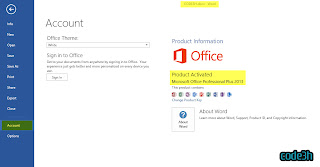
FREE Download Microsoft Office Professional Plus 2013 Full Version - Kalau beberapa waktu lalu koskomputer sudah berbagi Office ProPlus 2013 untuk Windows 64 Bit. Nahh,, kali ini giliran versi 32 Bit-nya yang akan koskomputer hadirkan pada malam hari ini. Untuk tampilan maupun fitur tidak ada bedanya antara 64 Bit dengan versi 32 Bit, dan di dalam paket rar juga sudah beserta aktivator yang dapat teman-teman manfaatkan untuk mengaktivasi Office ProPlus 2013 ini.

Screenshot

Link download
Single Link Mirror via BillionUploads
200 MB / Part Mirror via Hulkshare
200 MB / Part Mirror via Sharebeast
200 MB / Part Mirror via Zippyshare
Rar password: koskomputer.blogspot.com

INSTALL AND ACTIVATION INSTURCTIONS
Copy "KMSmicro v3.10.rar" on to Desktop and then extract it !

Activation of Office 2013: FRESH INSTALL (Recommended)
1. KMSmicro run and make the time synchronization (T)
2. Import the registry required data. Double-click on the file:
Office2010-Localhost.reg when you install Office 2010;
Office2013-Win7-Localhost.reg when you install Office 2013 on Windows 7;
Office2013-Win8-Localhost.reg when you install Office 2013 on Windows 8.
3.Install Office | Visio | Project VL.
4. Run the application and check the status of activation. If you suddenly see that require activation,
close the application, wait 1-2 minutes and check the status of the activation again. Rarely, but
it happens. Usually the product is activated immediately after installation
5. Close KMSmicro (S)

Activation of Office 2013: PRE INSTALLED
1. KMSmicro run and make the time synchronization (T)
2. Run one of the following cmd-file on behalf of the Adminstrator:
Office 2010 Activate.bat Office 2010-x32 & Windows-x32 or Office 2010-x64 & Windows-x64
Office 2010 (w64-o32) Activate.bat Office 2010-x32 & Windows-x64
Office 2013 Activate.bat Office 2013-x32 & Windows-x32 or Office 2013-x64 & Windows-x64
Office 2013 (w64-o32) Activate.bat Office 2013-x32 & Windows-x64.
If the end of a saw ��, the product is activated / activating extended.
3. Close KMSmicro (S)
NOTE:
Activation of Office 2013: FRESH INSTALL (Tested and Working), Screen Shots Included

More Information:
* ISO Images are directly from MSDN (UNTOUCHED), you can check the SHA
* KMSmicro Activator v3.10 is working fine, Tested on FRESH INSTALL METHOD (W8Pro x64)
* Please follow Instructions exactly given
* Office 2013 will be activated for next 180Days

* If you download from Hulkshare, rename parts extension after downloaded complete.
Example: Name_file.rar.mp3 to Name_file.rar

*Jika anda mendownload dari link Hulkshare, rename ekstensi part filenya dari .rar.mp3 ke .rar
Contoh: Nama_file.rar.mp3 ke Nama_file.rar
Jika masih bingung silahkan baca artikel berikut ==> click

Info
1. Hulkshare, Sharebeast & Zippyshare Interchangeable Links
2. Add 5% Recovery record
3. Total parts:
    BU = 1 / 873 MB
    HS, SB, ZS = 5 / 873 MB
4. Total files: 873 MB + Activator + 5% Recovery

Tutorial Cara Aktivasi Permanen Windows 8 via Phone

Tutorial Cara Aktivasi Permanen Windows 8 via Phone

Mengaktivasi win 8 agar dapat permanen teraktivasi memang lumayan sulit, untuk sukses dalam hal ini anda membutuhkan kesabaran dan keberuntungan yang baik. Dan untuk tutorial cara aktivasi permanen windows 8 kali ini di ambil dari tulisan tips / trik yang di buat oleh juragan alexandria666@kaskus, ada pun cara aktivasinya dapat teman-teman pelajari pada tutorial berikut ini:

Bahan yang di perlukan:
- Skype / Google Talk
-• Handphone kalau mau keluar duit + pulsa banyak
•- Kesabaran
**Telpon ini tidak memerlukan microphone

Pertama tama buka CMD run as administrator. caranya, klik kanan di taskbar pada ujung kiri bawah layar desktop.
Pilih command promt (Admin) setelah tekan yes, dan sudah masuk ke jendela cmd. masukan key dengan command ini: slmgr /ipk *key*
Setelah itu masukan command slui.exe 4 kemudian akan muncul jendela seperti di bawah ini. pilih negaranya. bisa UK/US
Setelah itu klik next. akan muncul jendela baru. Usahakan telpon yg toll free (gratis gak pakai pulsa)
Selanjutnya buka skype, klik call phones. pilih negara yg mau di telpon, masukin nomer yang dari toll free, kemudian call.
Setelah terkoneksi teleponnya, pencet show dial pad. nah ikutin aja petunjuknya, misalkan ditanya home user/bussiness pilih home saja. atau ditanya windows activation window open? pencet 1 saja. Setelah itu masukan kode yg bagian ini saat ditanya waktu telpon
Kode di atas sudah otomatis ter-generate sesuai dengan key yang anda gunakan !! Setelah itu akan di tanyakan berapa komputer yang menggunakannya, tekan saja 1. Barulah di sini anda akan dikasih tau kode konfirmasinya. pencet # untuk lanjut ke kode berikutnya, dan * untuk mengulangi. seteleh di konfirmasi, klik activate. dan VOILA ! sdh aktvasi permanen.

Semoga bermanfaat
^^

Kaspersky KAV KIS Keys 13.02.13

Kaspersky KAV KIS Keys 13.02.13

How To Use Guide:
  1. Open Kaspersky 2012 License Manager by clicking ‘Insert your activation code here’ or ‘Manage License’ (from lower right corner).
  2. Click the ‘Activate the application’ button.
  3. Disable your Internet connection (either disable Network adapter from control panel or turn off your modem/router).
  4. Select the ‘Activate commercial version’ radio button and enter the activation code as 11111-11111-11111-1111X. (Delete any trial key first if you want, by clicking the red X next to the license number).
  5. Click Next, you will then get the option to activate kaspersky using a key file.
  6. Browse to the key location on your computer and activate kaspersky using a key file. You can then turn on your Internet connection.
  7. Enjoy It
To Activate your KASPERSKY 2012 With KEYFILES
  1. Turn off/Unplug/Disconnect your internet connection
  2. Click “Manage License” From Right Bottom of Kaspersky, Then click “Activate the application”
  3. Enter key: AAAAA-AAAAA-AAAAA-AAAA3
  4. Click on Next
  5. In the next window, click on Browse
  6. Specify the path to any key (file) from the Keys folder
  7. Click on Next
  8. After activation switch on the internet
  9. Update virus definitions once/twice in a week to avoid key block
To activate your KASPERSKY 2011 With KEYFILES
  1. Open Kaspersky 2011 License Manager (from lower right corner).
  2. Click ‘Activate the application with a new license’ button. (Delete any trial key first, by clicking the red X next to the key).
  3. Select ‘Activate commercial version’ and enter the activation license code as 11111-11111-11111-1111X
  4. Wait activation wizard message->Click OK
  5. Wait for wrong activation code message->Click OK
  6. Screen will appear with KEY FILE BROWSE
  7. Browse to the key location and activate kaspersky.
Download:

TusFiles
Download Kaspersky KAV KIS Keys 13.02.13.rar (418 KB)

 
Design By WIN7KOM | Published By Akbar Ramadhan